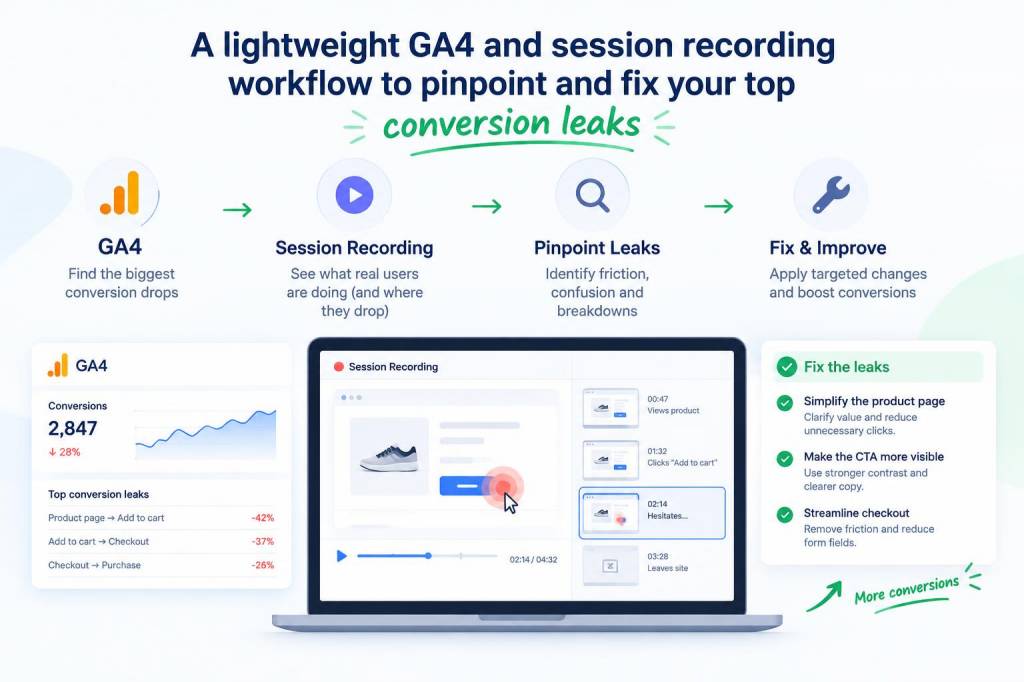
I’ve been iterating on analytics workflows for years, and one lesson keeps coming back: you don’t need a heavy analytics stack to find and fix the leaks that kill conversions. What you need is a focused pipeline that ties GA4 behavioral signals to a small number of session recordings so you can watch real users make real mistakes. Below I share a lightweight, privacy-aware GA4 + session recording workflow that I use to pinpoint and fix my top conversion leaks quickly.
Why lightweight matters
Heavy analytics setups slow down pages, complicate consent, and create heaps of data you’ll never look at. A lightweight approach reduces performance impact, simplifies troubleshooting, and helps you move from insight to action — faster. I aim for three outcomes:
Core principles
My approach is guided by a few simple principles:
Tools I recommend
There are many product analytics and session recording tools. For a lightweight stack I usually combine GA4 with one of these:
| GA4 | Core analytics, events, funnels, audiences |
| Hotjar / FullStory / Smartlook | Targeted session recordings + heatmaps |
| Consent solution (OneTrust, Cookiebot, or custom) | Manage recording/analytics opt-ins |
| Optional: Tag manager (Google Tag Manager Server-side) | Reduce client load and improve data quality |
FullStory and Hotjar are great, but if you want to minimize footprint, Smartlook or a well-configured open-source recorder can be lighter. Also consider server-side tagging to offload work from the browser.
Step-by-step workflow
Here’s the practical workflow I follow whenever I’m chasing conversion leaks.
Start by mapping the user journey you care about — for example: Landing Page → Product Page → Add to Cart → Checkout Start → Purchase. In GA4 I create conversion events for each critical step (e.g., view_item, add_to_cart, begin_checkout, purchase). Make sure event names are consistent and use parameters for context (product_id, value, currency).
Use GA4 DebugView during QA and a short test window to ensure events fire reliably across common browsers and devices. Also check event parameter cardinality: avoid sending high-cardinality strings as primary event parameters (like raw email). Keep the event payload minimal.
In GA4 Explorations, build a funnel to see where drop-off is highest. Don’t stop at overall funnel conversion rate — break by traffic source, device type, page path, and campaign. For example, you might see mobile users from a specific paid campaign drop at “Add to Cart”. That’s your lead.
Turn the problematic segment into an audience in GA4 (e.g., “Mobile paid users who reached product page but didn’t add to cart”). Then integrate or export that audience to your session recording tool so you only capture sessions from users who match the failure pattern.
Configure your session recorder to only capture sessions that match the audience. Additionally, exclude or mask sensitive fields (checkout forms, payment inputs) and respect consent flags. This keeps recordings manageable and compliant.
Viewing recordings without a hypothesis leads to confirmation bias. Before watching, ask: what could be causing the drop? Examples:
Now watch 20–50 targeted replays, looking for repeated patterns: rage clicks, field abandonment, scroll hesitations, or micro-conversions never firing.
Document each issue and estimate impact (how many conversions are likely affected) and effort to fix. I use a simple prioritization matrix: high impact + low effort goes first. Typical quick wins include:
After a fix, validate two things: analytics correctness and UX improvement. In GA4, monitor the affected funnel step and watch the relevant audience’s conversion rate. In session recordings, look for disappearance of the observed failure modes.
If a change is significant (pricing UI, flow redesign), run an experiment (Google Optimize alternatives if needed) to measure lift. For small UX changes, you can often rely on pre/post metrics in GA4 combined with session evidence.
Create a simple playbook entry: what happened, root cause, fix applied, results. Share it with product and engineering so similar leaks are prevented elsewhere.
Privacy and performance considerations
Two practical notes I always stress:
Common pitfalls and how I avoid them
From my experience, these mistakes slow teams down:
Quick checklist to get started (15–30 minutes)
This workflow scales: for small sites it’s just GA4 + Hotjar; for larger products it can expand into server-side tagging and BigQuery analysis. But the core stays the same — targeted data, targeted recordings, and quick feedback loops. When you pair a clean GA4 funnel with a handful of relevant session replays, you’ll find the leaks faster and ship fixes that actually move the needle.