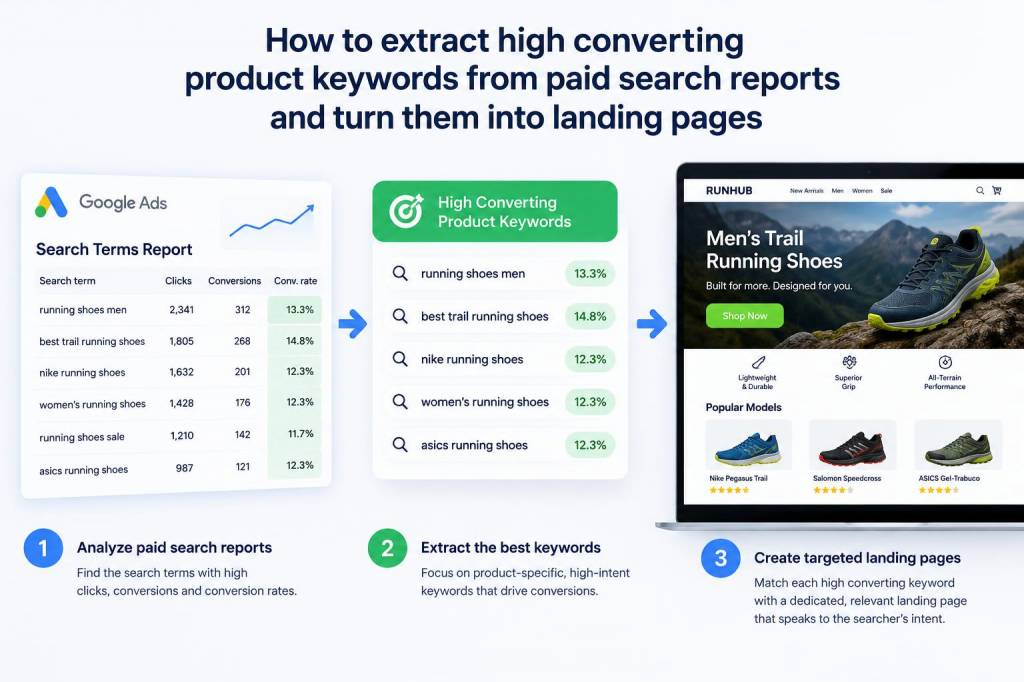
I often find the most valuable keywords hiding in plain sight: nested inside paid search reports. Over the years I've turned those raw paid data points into high-converting product landing pages that scale revenue and reduce CPA. In this article I’ll walk you through my exact process — from extracting the right query and search term insights to shaping them into page-level intent that converts.
Why paid search reports are a goldmine for product keywords
PPC reports give you real user intent — the queries people actually typed before clicking on your ads. Unlike broad SEO keyword research, search term reports reveal which combinations of product attributes, benefits and buying phrases lead to clicks and conversions. When you mine this data correctly, you get:
I treat paid search reports like a user-feedback loop. If a phrase has a good conversion rate in paid, it’s often a winner organically once you build a targeted landing experience and earn some backlinks.
Step 1 — Export and normalize search term and keyword data
Start with a comprehensive export from Google Ads (or Microsoft Ads). I include at minimum:
Then I normalize: trim whitespace, unify capitalization, and remove near-duplicates (e.g., plural vs singular) so I can focus on meaningful variations. A simple spreadsheet or Google Sheets script works fine; for larger accounts I use BigQuery or a BI tool to join data across campaigns.
Step 2 — Prioritize by commercial intent and conversion efficiency
Not every frequent search term is worth targeting. I score terms using a combination of metrics:
I typically create a prioritized list of high intent terms: those with above-average conversion rates and acceptable CPA. These become my primary candidates for dedicated landing pages or product page optimizations.
Step 3 — Group terms into intent clusters
Next I cluster terms into logical groups — not just by word similarity, but by user intent:
For example, if my paid report shows “men’s trail running shoes waterproof” and “waterproof trail runners sale”, those both map to a transactional-feature cluster and deserve a product landing page emphasising waterproof tech, availability, and price-focused CTAs. Meanwhile “best trail running shoes for rock” might need a comparison-style page or guide.
Step 4 — Map clusters to page types
Different clusters require different page templates. Here are the mappings I use:
I always check whether an existing product page can be optimized first. If the ecommerce page already ranks and converts, sometimes reworking H1s, meta, product descriptions and adding targeted sections is enough — no new page needed.
Step 5 — Craft landing page content informed by paid ad copy and extensions
Paid ads are A/B tested copy distilled from what resonates. I lift ideas from top-performing ad headlines and descriptions and fold them into landing page messaging:
Paid ad extensions like sitelinks and callouts show which features buyers care about. If “30-day returns” appears often in successful extensions, highlight it prominently on the page.
Step 6 — Design page elements for conversion and SEO
A high-converting landing page needs both UX and SEO hygiene. I follow a checklist:
For ecommerce, I create a product hero that mirrors the ad visuals, and an FAQ or comparison block for those who research before buying.
Step 7 — Track, iterate and close the loop with paid search
After launching the page, I monitor key metrics and keep paid and organic aligned:
If the landing page improves organic conversion, reduce ad spend to maximize ROAS and use the freed budget to test new keyword clusters. If the page underperforms, re-evaluate messaging, offers and page speed. Paid data continues to feed the loop — new search terms from ads become new content ideas.
Example: turning a paid winner into a landing page
Recently I worked with an outdoor gear brand. Their paid search report revealed “insulated down jacket women lightweight compressible” had strong conversion and low CPA. The existing product page mentioned “lightweight” but didn’t answer compression storage or temperature range.
Actions I took:
Results: organic rankings moved onto page 1 for the phrase within six weeks, and conversion rate improved by 28% vs the old product page. We also reduced PPC spend for that term and still maintained overall sales volume.
Quick checklist to get started today
- Export search term reports and normalize data.
- Prioritize by conversion rate and CPA.
- Cluster by intent, not just wording.
- Map clusters to the right page type.
- Use winning ad copy and extensions in your on-page messaging.
- Optimize page speed, schema and conversion elements.
- Monitor both organic and paid results and iterate.
If you want, I can help you review a specific paid search report and sketch a page plan tailored to your top-converting terms. Drop a sample export and I’ll show which phrases I’d prioritize and how I’d structure the landing pages to maximize conversions.