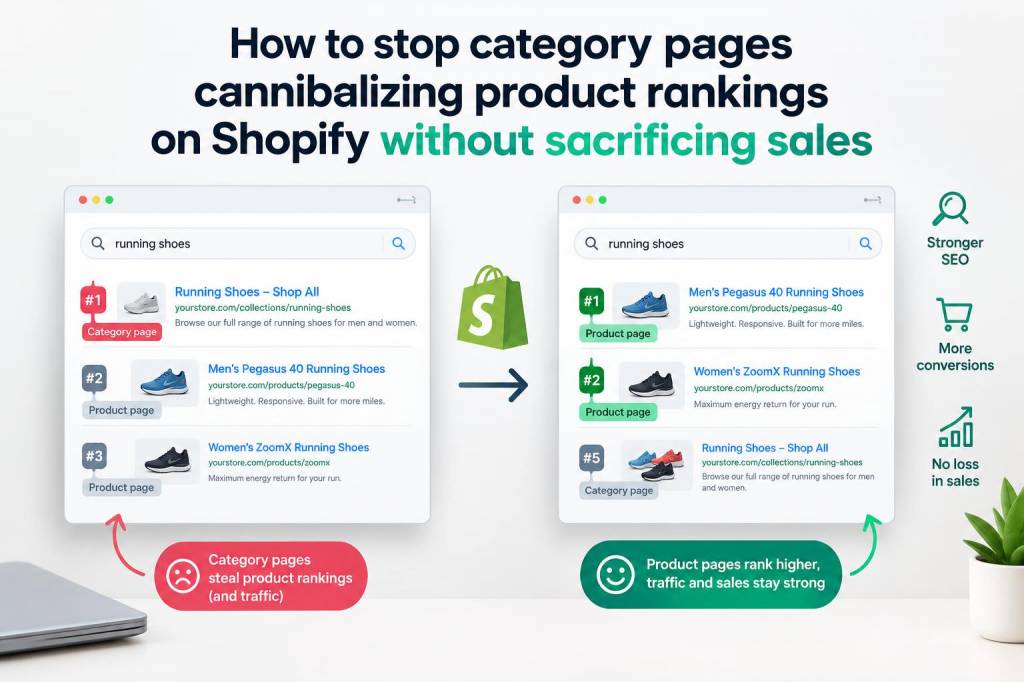
I’ve seen this problem over and over on Shopify stores: category (collection) pages start outranking the very product pages they’re meant to promote. It’s frustrating — customers click a collection, land on a generic overview, then have to hunt for the exact product. The result is lost organic visibility for product pages, confused search signals for Google, and usually lower conversions. Here’s a practical, hands-on guide I use to stop collection pages from cannibalizing product rankings, while preserving — and often improving — sales.
Understand why cannibalization happens
Before changing anything, I always diagnose. Cannibalization usually happens because collection pages and product pages share very similar content, titles, or internal linking patterns. On Shopify, collection pages often inherit the same keywords and lack distinguishing content. Google then sees multiple pages vying for the same intent and may surface the collection instead of the product.
Common culprits I look for:
Step-by-step fixes I implement on Shopify
These are practical steps that work together — you don’t need all of them, but the best results come from combining several.
I map primary keywords to a single target page. For example, if “women’s red mini dress” is a product-level commercial keyword, I make the product page the primary target. The collection targets broader commercial modifiers like “red dresses” or informational terms like “best red dresses for summer.” This reduces direct competition.
Instead of leaving collection pages with template text, I add 150–400 words of unique, helpful content at the top or bottom. Think buyer guidance, fit tips, or trends. This differentiates the collection page as a category hub rather than duplicating product-level content.
Give each product page and collection distinct meta titles aligned with their intent. Example:
- Product: “Scarlett Red Mini Dress — Satin, Size XS–XL | BrandName”
- Collection: “Red Dresses — Mini, Midi & Maxi Styles | BrandName”
Clear intent signals help Google pick the right page for search queries.
Shopify automatically sets canonical tags, but faceted navigation or external parameters can create duplicate URLs. I ensure product pages point to their canonical URLs and collection filter URLs either set canonical to the main collection or are blocked from indexing. When a product is accessible via multiple collections, each product page canonicalizes to its own URL, not the collection.
I add or verify Product structured data on the product page (price, availability, reviews). Collections should have Category schema only if appropriate. Rich Product schema strengthens the product page as the authoritative source for commercial queries.
Facets often generate thousands of indexable URLs. I either:
- Use robots.txt to disallow obvious filter parameter paths, or
- Add rel="canonical" from filtered URLs to the parent collection, or
- Use noindex, follow on low-value filter pages
On Shopify, apps like Smart SEO or custom Liquid code help manage this.
I make sure internal links from the homepage, blog posts, and major category pages point to the product page for transactional keywords. On collection pages I still link to product pages, but I avoid over-linking to the collection for high-intent anchors. For example, use “Buy Scarlett Red Mini Dress” linking to the product rather than “red dresses” linking to the collection when search intent is clearly product-focused.
Audit anchor text across the site. Too many links using the same product keyword pointing to the collection will confuse Google. I diversify anchors and use more descriptive anchors that highlight product attributes when linking to product pages.
On Shopify, tags can create collection-like pages. I keep the primary SEO-accessible pages to collections and minimize indexable tag pages. If a tag page isn’t meant to rank independently, I set it to noindex.
In some cases, I temporarily add noindex to a high-ranking collection that’s stealing clicks from a product page, then monitor traffic and conversions. If product traffic and sales increase, I keep the change or refine it. If sales drop (possible if collection drives discovery and conversion), I revert and try other tactics like boosting product schema and internal links.
Shopify-specific implementation tips
Shopify offers Liquid templates and apps that make some of these changes easier:
Monitoring and measuring success
After changes, I watch three metrics closely:
If product impressions climb while collection impressions stabilize or decrease, that’s usually a good sign. If conversions drop, I reassess — maybe the collection was playing an important discovery role and needs different copy or a clearer path to product pages.
Practical checklist
| Action | Why |
| Map keywords to single pages | Prevents internal competition |
| Unique collection copy (150–400 words) | Differentiates category vs product |
| Distinct meta titles/descriptions | Signals intent to Google |
| Ensure correct canonicals | Stop search engines from indexing duplicates |
| Add Product schema | Boosts product authority and rich results |
| Control filter URLs (noindex/canonical) | Reduce low-value indexable pages |
| Adjust internal linking/anchors | Tell crawlers which page is most important |
| Monitor Search Console & GA | Validate impact on visibility and sales |
Preventing cannibalization is as much about content strategy as it is about technical SEO. By clarifying intent for each page, strengthening product pages with schema and unique content, and ensuring proper canonical and internal linking practices on Shopify, you can reclaim product rankings without sacrificing the discovery and conversion power of your collections.